
Azan and Mosques1.2.1 - Google Play
You'll be able to see results in few seconds.
Publisher Description
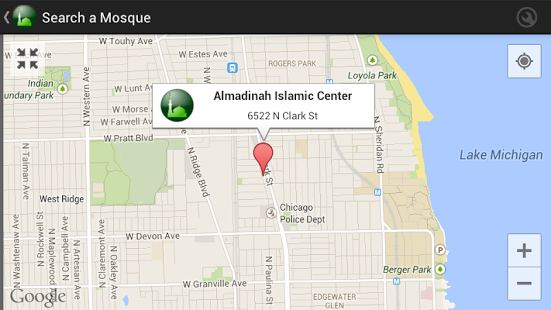
Find nearby mosques or search a mosque in a specific locality, get qibla direction and exact prayer times based on your location, these are some features of Azan and Masajid application.
Application features:
- Mosques finder based on your current location, with map directions.
- Search a mosque by country and city.
- Prayer times with azan notification, supporting all the well known calcuation algorithms.
- Qibla direction.
- Auto detect your location using GPS and/or 3G or Wifi.
- Set your location manually (the app includes 23000 localities all over the world)
- Multilingual (Arabic, English, French, German, Malay).
- Highly configurable.
Supported countries:
- For Prayer times and Qibla direction: all countries are supported
- For Mosques finding:
Algeria
Belgium
Egypt
France
Germany
Indonesia
Libya
Malaysia
Morocco
Nigeria
Pakistan
Saudi Arabia and GCC countries
Turkey
United Kingdom
United States
This list will grow in the next version
You can contribute:
You are cordially invited to contribute to this application by adding new mosques or correcting existing ones via this website: www.azanmosques.com
About Azan and Mosques
The company that develops Azan and Mosques is MAROC ANDROID. The latest version released by its developer is 1.2.1.
To install Azan and Mosques on your Android device, just click the green Continue To App button above to start the installation process. The app is listed on our website since 2014-02-20 and was downloaded 0 times. We have already checked if the download link is safe, however for your own protection we recommend that you scan the downloaded app with your antivirus. Your antivirus may detect the Azan and Mosques as malware as malware if the download link to ma.marocandroid.masajid is broken.
How to install Azan and Mosques on your Android device:
- Click on the Continue To App button on our website. This will redirect you to Google Play.
- Once the Azan and Mosques is shown in the Google Play listing of your Android device, you can start its download and installation. Tap on the Install button located below the search bar and to the right of the app icon.
- A pop-up window with the permissions required by Azan and Mosques will be shown. Click on Accept to continue the process.
- Azan and Mosques will be downloaded onto your device, displaying a progress. Once the download completes, the installation will start and you'll get a notification after the installation is finished.
Program Details
System requirements
Download information
Pricing
Version History
version 1.2.1
posted on 2014-02-20
Changes in 1.2.1:,- Fixing "enable/disable azan when phone on silent" setting present but not working,- Fixing "disabling azan" not working properly,- Fixing some bugs (if application still crashes please use the report button so we can fix it).,Changes in 1.2:,- Bug fixes,- New countries added,- New times calculation methods added,- Widgets added,- Hijri date added,- Fajr azan sound added,- Improving calculation and azan notification
version 1.2.1
posted on 2014-02-20
Several fixes and updates
Disclaimer
Official Google Play Link
We do not host Azan and Mosques on our servers. We did not scan it for viruses, adware, spyware or other type of malware. This app is hosted by Google and passed their terms and conditions to be listed there. We recommend caution when installing it.
The Google Play link for Azan and Mosques is provided to you by apps112.com without any warranties, representations or guarantees of any kind, so access it at your own risk.
If you have questions regarding this particular app contact the publisher directly. For questions about the functionalities of apps112.com contact us.
